
AI document processing (IDP) turns scanned or digital documents into structured, agent-ready data using optical character recognition, layout-aware vision models, and large language model normalization. The output is clean, validated data that downstream systems can act on immediately, not another PDF a person has to reread. Organizations that automate this correctly report significant time savings on document-heavy tasks, along with fewer manual errors in fields like invoicing, claims, and compliance filings.
TL;DR:
- AI document processing offers higher accuracy by understanding document structure, layout, and relationships beyond simple character recognition.
- For highly variable or regulated documents, end-to-end vision-language models can simplify architecture but may increase inference costs at scale.
- Structured, field-level output with bounding boxes and confidence scores is essential for auditability and error tracing in production systems.
- Cost efficiency depends on volume and technology choice, with open-source tools favoring large archives and managed APIs better suited for high-stakes workflows.
- Rigorous data labeling, validation, and security measures, including encryption and compliance controls, are critical for reliable and compliant deployment.
Table of Contents
- What Is AI Document Processing (And How Is It Different From OCR)?
- How Does a Modern AI Document Processing Pipeline Work?
- What Technologies Power AI Document Processing?
- How Do You Integrate AI Document Processing Into Production Systems?
- How Accurate Is AI Document Processing?
- What Does AI Document Processing Cost at Scale?
- What Are the Biggest Risks in AI Document Processing?
- How Qoode Approaches Custom AI Document Processing Projects
- How Do You Fine-Tune AI Models for Specific Document Types?
- What Architecture Patterns Work Best for Scalable IDP Systems?
- What Do Real-World AI Document Processing Deployments Look Like?
- How Should You Approach Data Labeling for Document AI Models?
- How Do You Secure Documents Beyond Basic Compliance Requirements?
- How Is Multimodal AI Changing Document Understanding?
- When Should You Pilot AI Document Processing?
- Ready to Build a Custom AI Document Processing Solution?
- Sources
- FAQ
What Is AI Document Processing (And How Is It Different From OCR)?
Traditional OCR does one thing: it converts pixels into characters. It tells you a page contains the word "Invoice" and the number "4,521.00," but it has no idea whether that number is a subtotal, a tax line, or a shipping charge. AI document processing goes several steps further. It reads the layout, understands the relationship between a label and its value, follows tables across page breaks, and maps everything into a schema your systems can consume.
That distinction matters because most business documents aren't clean, single-purpose files. A commercial lease might mix typed clauses with handwritten amendments. A claims packet might bundle a scanned fax, a native PDF, and a photographed receipt into one 40-page file. Legacy OCR treats all of it as flat text. Modern IDP treats it as a document with structure: headers, footers, tables, checkboxes, signature blocks, and reading order.
Layout awareness is the real unlock here. A two-column contract read top to bottom instead of column by column produces nonsense. A table with merged cells parsed as plain text scrambles line items. This is why layout analysis and reading-order recovery sit at the center of any serious IDP architecture, not as an afterthought bolted onto OCR output.
Document types generally fall into three buckets, and each demands a different level of processing sophistication:
- Born-digital documents (PDFs generated from Word, invoicing software, or e-signature platforms) carry embedded text and positional metadata, making extraction more reliable from the start.
- Scanned or photographed documents require image preprocessing, deskewing, and noise reduction before any text recognition can happen accurately.
- Hybrid documents combine both, such as a digitally generated form with a handwritten signature or a stamped approval, and need dual-path handling within a single file.
Getting this baseline right determines whether everything built on top of it, extraction, validation, routing, actually holds up in production.
How Does a Modern AI Document Processing Pipeline Work?
A production-grade IDP system is not a single model call. It's a pipeline with distinct stages, each with its own failure modes and its own opportunity to catch errors before they reach a downstream system.
- Ingestion. Documents arrive through email inboxes, scanner folders, upload portals, or API connectors tied to a CRM or ERP. A well-built ingestion layer normalizes file types (PDF, TIFF, JPEG, native Office formats) and tags each document with source metadata before any processing begins.
- Classification and splitting. Many real-world uploads aren't single documents. A multi-page fax might contain three separate invoices and a cover sheet. The splitter logic identifies document boundaries and classifies each segment (invoice, purchase order, ID document) before extraction starts, which prevents a classic and costly error: extracting fields from the wrong document type.
- Extraction. This is where schema-first extraction earns its keep. Rather than asking a model to "read the document," you define the target fields (vendor name, invoice number, line items, due date) and the extraction layer maps content to that schema. For high-variance layouts, zero-shot or LLM-assisted extraction handles documents the system has never seen, while table parsing logic reconstructs multi-row, multi-column data that plain text extraction would flatten into gibberish.
- Validation. Confidence scoring routes low-certainty fields to a human reviewer instead of pushing bad data downstream silently. This is the human-in-the-loop pattern that separates a demo from a production system.
- Enrichment and routing. Extracted data gets cross-referenced against existing records (matching a vendor name to a master vendor list, for instance), then routed into the target system, whether that's an ERP, a database, or a robotic process automation (RPA) trigger for the next workflow step.
Pro Tip: Build your splitter and classifier before you obsess over extraction accuracy. A perfect extraction model applied to a misclassified document produces perfectly wrong data, and no amount of downstream validation fixes a document that got routed to the wrong schema in step one.
Generative AI extraction models have lowered the barrier for schema customization considerably. Google Cloud's Document AI reports that its custom extractors can be fine-tuned with as few as 10 training documents to reach solid accuracy on a specific extraction task, which changes the calculus for teams that used to assume they needed thousands of labeled samples before touching a niche document type.
What Technologies Power AI Document Processing?
Every IDP system is built from a stack of overlapping technologies, and the right combination depends heavily on document variability and how much accuracy you can trade for speed.
OCR has improved substantially beyond simple character recognition. Modern engines handle rotated pages, low-contrast scans, and even cursive handwriting far better than the OCR tools most engineers remember from a decade ago. Image preprocessing, denoising, deskewing, contrast normalization, still matters enormously for scanned archives, and skipping it is one of the most common causes of poor downstream accuracy.
Layout analysis reconstructs the visual structure of a page: columns, tables, headers, and reading order. Without it, a two-column resume or a multi-column financial statement gets read left-to-right across columns instead of down each column, corrupting the extracted text before extraction even starts.
Vision-language models (VLMs) and multimodal LLMs (MLLMs) represent the more recent shift in the field. Instead of chaining separate OCR, layout, and extraction steps, an end-to-end VLM can look at a page image and return structured, linearized output in a single pass. Research comparing these approaches finds real trade-offs: pipeline-based systems chain specialized components for layout and table parsing, while end-to-end models simplify the architecture but shift more cost and complexity into inference. Smaller optimized vision-language models, following patterns similar to SmolDocling's compact architecture, are narrowing that cost gap for teams that don't need frontier-scale models for every page.
LLMs handle the normalization layer: mapping raw extracted values to a target schema, standardizing date formats, resolving abbreviations, and flagging inconsistencies a rules engine would miss. This is also where hallucination risk concentrates, an LLM asked to "fill in" a missing field can invent a plausible-looking value instead of flagging it as absent.
Choosing between a modular pipeline and an end-to-end VLM comes down to three variables:
- Document variance: highly standardized forms favor modular pipelines with tuned extractors; wildly inconsistent layouts favor VLM flexibility.
- Latency and cost tolerance: pipelines tend to run cheaper per page at scale; end-to-end VLMs simplify engineering but raise per-page inference cost.
- Grounding requirements: regulated workflows need traceability back to source text, which pipeline architectures with explicit bounding-box output handle more transparently.
How Do You Integrate AI Document Processing Into Production Systems?
The extraction model is the easy part. Getting structured output into your ERP, CRM, or claims system without breaking anything, that's where most IDP projects actually stall.
Schema-first output is non-negotiable at scale. Instead of returning free text, a production system should return structured JSON or Markdown, complete with bounding-box coordinates that tie every extracted field back to its exact location on the source page. This is the mechanism behind auditability: when a reviewer questions a number, the system can show precisely where on the document it came from rather than asking someone to trust a black box.
Agentic extraction APIs have made this pattern more accessible. LandingAI's agentic document-extraction approach preserves layout, returns bounding-box citations alongside confidence scores, and supports the kind of audit-ready traceability that regulated industries, insurance, healthcare, financial services, generally require before they'll approve a production rollout.
Deployment architecture depends heavily on data sensitivity. Public cloud APIs work fine for low-sensitivity documents at high volume. Documents containing personal health information, financial account numbers, or EU-resident personal data often require a virtual private cloud (VPC) deployment or fully on-premises processing to satisfy data residency requirements. This decision should happen before you pick a vendor, not after a compliance review flags it.
Key elements of a defensible integration layer include:
- Bounding-box citations on every extracted field, so any output can be traced back to its exact source location.
- Confidence scores attached at the field level, not just the document level, so low-certainty extractions can be routed for review automatically.
- Review logs capturing who corrected what and when, which becomes essential during audits or model retraining.
- Feedback loops that feed corrected fields back into the extraction model, improving accuracy on recurring document types over time.
Pro Tip: Treat your review logs as training data from day one. Every human correction is a labeled example, and teams that discard this data end up re-collecting it manually months later when they finally decide to fine-tune a custom extractor.
Instant learning from review corrections, sometimes called active learning, closes the loop between production use and model improvement without requiring a full retraining cycle every time. For teams integrating IDP output into existing infrastructure, custom API and integration work tends to matter more for long-term reliability than the extraction model itself.
How Accurate Is AI Document Processing?
Vendor accuracy claims are almost useless without knowing what was measured. The metrics that actually matter operate at the field level, not the document level: field-level precision, recall, and F1 score tell you how often a specific field (invoice total, vendor tax ID, due date) was extracted correctly, missed, or extracted wrong.
Pass-through rate is the metric that determines your actual operational cost: the percentage of documents that clear validation with no human touch at all. A system with 95% field accuracy but a 40% pass-through rate still means most documents land on someone's review queue.
What the data shows: Organizations implementing AI-powered document processing can save up to 70% of the time previously spent on manual document handling and cross-application data matching, a gain that depends heavily on how well confidence thresholds and validation routing are tuned for the specific document type.
When evaluating a vendor's accuracy claims, ask for a trial run against a representative sample pulled from your own document archive, not a curated demo set. Vendors like SAP typically offer proof-of-concept testing with sample documents precisely because published benchmarks rarely reflect a specific organization's document mix. Insist on seeing field-level results broken out by document type, and design your benchmark sample to include the messiest documents in your archive, not just the clean ones.
What Does AI Document Processing Cost at Scale?
Four cost drivers dominate any large-scale IDP deployment: model inference (charged per page or per API call), preprocessing (image cleanup for scanned archives), storage, and human review time for flagged documents. Review time is usually the hidden cost that blows past initial budget estimates, especially early on when confidence thresholds haven't been tuned yet.
Cost benchmark: Optimized open-source pipelines like olmOCR can convert roughly one million PDF pages for about $190 in reported tests, a figure that makes mass digitization of legacy archives financially realistic in a way it wasn't a few years ago.
Practical scaling guidance:
- Batch processing suits large archive conversions where latency doesn't matter; parallelizing across worker nodes brings per-page cost down substantially.
- Streaming processing fits real-time workflows like invoice intake, where a document needs a decision within seconds, not hours.
- Open-source toolkits make the most sense for high-volume, cost-sensitive conversions of historical archives.
- Managed commercial APIs make more sense for lower-volume, high-stakes workflows where support, SLAs, and built-in compliance controls outweigh the per-page cost premium.
What Are the Biggest Risks in AI Document Processing?
Hallucination is the risk engineers underestimate most. An LLM asked to extract a missing field can generate a plausible value instead of returning a null, and that failure mode is dangerous precisely because it looks correct. The mitigation is architectural, not aspirational: require every extracted value to carry a bounding-box citation back to source text, and run schema validation that rejects values with no grounding evidence.
Other governance concerns worth building for from day one:
- Privacy and compliance controls, including encryption and VPC or on-premises deployment options, matter more once documents contain personal or financial data subject to EU data residency requirements.
- Handwriting and mixed-language content still degrade accuracy more than clean, single-language typed text, and benchmarks should test against your actual document mix, not a vendor's best-case sample.
- Multi-pass verification, running extraction twice with different methods and flagging disagreements, catches errors that a single-pass system would miss silently.
- Ensemble parsing, combining OCR-based and VLM-based extraction on the same document, adds resilience against any single model's blind spots.
How Qoode Approaches Custom AI Document Processing Projects
Qoode scopes every IDP engagement with upfront timelines and cost before development starts, then delivers iteratively so clients see working extraction against their own documents early, not months in.
- Extraction schemas built around actual document types, not a generic template.
- Integrations with existing ERP and CRM systems so extracted data lands where teams already work.
- Review interfaces designed for users who validate flagged fields, not just the model behind them.
How Do You Fine-Tune AI Models for Specific Document Types?
Generic extraction models handle standard forms reasonably well. Specialized documents, medical intake forms, engineering specs, industry-specific contracts, usually need fine-tuning to reach production-grade accuracy.
The practical workflow starts smaller than most teams expect. Rather than assembling thousands of labeled examples, generative extraction models can now be fine-tuned with as few as 10 representative documents to adapt to a custom schema, provided those examples genuinely represent the variance in the target document set: different layouts, different vendors, different quality levels.
Fine-tuning for document-specific tasks generally targets one of three layers. Extraction fine-tuning adjusts how the model maps raw content to schema fields for a specific document type, useful when standard field names don't match your target schema. Layout fine-tuning helps a model handle a recurring but unusual page structure, a specific insurance form, for instance, that a general-purpose layout model misreads consistently. Normalization fine-tuning trains the LLM layer to handle domain-specific abbreviations, units, or coding systems (ICD codes in healthcare, SKU formats in retail) that a general model wouldn't recognize reliably.
The pattern that works best in practice is iterative: fine-tune on a small representative batch, run it against a held-out validation set, review the errors with a subject-matter expert, then retrain on the corrected examples. Skipping the expert review step is the most common reason fine-tuned models underperform once they hit real production volume, the errors were systematic, not random, and nobody caught the pattern before deployment.
What Architecture Patterns Work Best for Scalable IDP Systems?
The most resilient IDP systems share a common architectural principle: modularity. Each stage, ingestion, classification, extraction, validation, routing, runs as an independent service with a defined input and output contract. This matters because document types and volumes change constantly, and a monolithic system that couples extraction logic to routing logic becomes nearly impossible to update without breaking something downstream.
A pragmatic pattern gaining traction is multi-pass agentic processing: a layout-analysis pass performs coarse extraction, a schema-mapping pass runs LLM normalization with explicit grounding back to source text, then a validation pass routes flagged fields for human review. This structure balances throughput against reliability better than a single monolithic model call, because each pass can be monitored, measured, and improved independently.
Event-driven architecture tends to outperform synchronous request-response designs at scale. A document lands in a queue, triggers classification, which triggers extraction, which triggers validation, each stage publishing an event the next stage consumes. This decoupling means a spike in scanned invoices doesn't block processing of digital contracts sitting in a separate queue, and it means you can scale each component independently based on its own bottleneck.
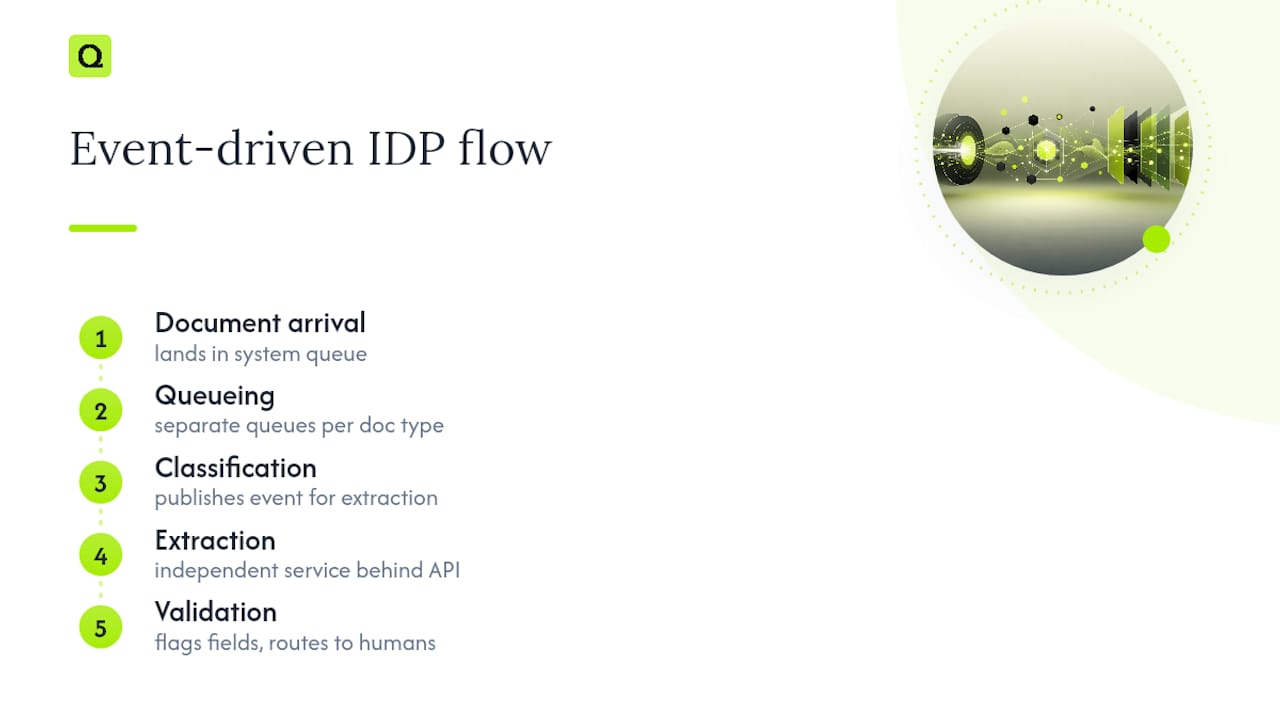
For teams building custom systems rather than buying an off-the-shelf platform, the architecture decision that matters most early is whether extraction logic lives behind a stable internal API. A well-defined internal API layer means you can swap out the underlying extraction model, from a modular OCR pipeline to an end-to-end VLM, without rewriting every downstream integration that depends on it.
What Do Real-World AI Document Processing Deployments Look Like?
Enterprise deployments tend to converge on a similar operational shape once they mature past pilot stage: multi-pass processing, field-level confidence scoring, native table extraction, and human-in-the-loop validation working together rather than any single component carrying the whole system. Platforms like Sema4.ai's document intelligence tooling illustrate this pattern, combining these features specifically to reach the reliability threshold production environments demand.
A financial services back office processing loan documents, for instance, typically layers table extraction (for amortization schedules) with confidence-based routing (flagging any interest rate field below a set certainty threshold) and an audit trail tied to each extracted value. The outcome isn't a fully autonomous system. It's a system where a human reviewer spends time only on the fraction of documents the model genuinely can't handle confidently, which is a very different cost profile from full manual review.
Insurance claims processing follows a similar shape but with heavier emphasis on document classification upfront, since a single claims packet might bundle a police report, medical records, and repair estimates into one submission. The splitter and classifier stages carry disproportionate weight in this use case, because misrouting a medical record to a property-damage schema produces extraction errors no amount of downstream validation catches cleanly.
The common thread across working deployments isn't the specific model chosen. It's the discipline of building validation and audit trails into the pipeline from the start, rather than bolting them on after a compliance review flags gaps.
How Should You Approach Data Labeling for Document AI Models?
Labeling quality determines model performance more than model choice does, and this holds especially true for document-specific fine-tuning where training sets are intentionally small.
Effective annotation for document AI starts with representative sampling. A labeled set of 50 documents that all come from the same vendor, in the same format, teaches the model nothing about the variance it will encounter in production. Better to label 20 documents spanning five different layouts than 50 documents from one template.
Field-level annotation, marking not just "this is an invoice" but "this specific bounding box is the due date," produces far more useful training signal than document-level tagging alone. This granularity is what allows a fine-tuned model to generalize to new documents with similar structure, rather than memorizing the exact position of fields in the training set.
Annotator agreement matters more than annotator speed. Having two people independently label the same sample and comparing results catches ambiguous cases, is that a "shipping date" or a "delivery date" field, before they poison the training set. Documents where annotators disagree are usually the exact edge cases the model will struggle with in production, so they deserve extra attention rather than a quick tiebreaker decision.
Finally, treat corrected outputs from production review queues as an ongoing labeling pipeline, not a one-time setup task. The documents that fail validation in production are, by definition, the hardest cases your model needs to learn from next.
How Do You Secure Documents Beyond Basic Compliance Requirements?
Compliance certifications tell you a vendor met a baseline. They don't tell you whether your specific data is actually protected end to end, and that gap is where security incidents tend to happen.
Encryption in transit should apply to every hop a document takes, from upload through API calls between pipeline stages to the final write into your ERP or database. It's common to see encryption applied at the perimeter (upload and download) while internal service-to-service calls within a pipeline run unencrypted, an easy gap to miss during a security review.
Encryption at rest needs to cover not just the final extracted data but intermediate artifacts: the raw document itself, the OCR'd text layer, any cached model outputs. Teams sometimes encrypt the database record while leaving a temporary file cache unencrypted on a processing server, a gap that only surfaces during a penetration test or, worse, an actual breach.
Beyond encryption, a few practices separate genuinely secure deployments from ones that merely pass an audit:
- Least-privilege access on extraction outputs, so a customer service tool can read extracted invoice totals without also getting access to raw scanned documents containing full account numbers.
- Data residency controls, keeping processing within a specific region via VPC or on-premises deployment when documents contain EU-resident personal data or other regionally regulated information.
- Retention policies that actually delete source documents and intermediate artifacts on schedule, rather than accumulating them indefinitely in a storage bucket nobody audits.
- Access logging on every extraction and review action, not just document uploads, so an audit can reconstruct exactly who saw what.
How Is Multimodal AI Changing Document Understanding?
The recent shift toward multimodal AI, models that process images and text together rather than as separate pipeline stages, is changing what counts as achievable for messy, high-variance documents.
Vision-language models can now interpret a document's visual structure directly: recognizing that a number is boxed in a specific field, that a checkbox is marked, that a stamp overlaps part of a signature line, without a separate layout-analysis step translating that visual information into text first. This matters enormously for documents where meaning depends on visual context that plain text extraction discards entirely, a form, where a checked box means "approved" and an unchecked one means "pending," carries information no OCR engine alone can recover.

Research comparing pipeline and end-to-end approaches shows this isn't a simple upgrade, it's a genuine architectural trade-off. Pipeline systems that chain specialized layout and table parsing components still outperform end-to-end models on certain structured extraction tasks, while end-to-end multimodal models simplify engineering considerably and handle novel layouts more gracefully. The efficiency gap is narrowing too: compact vision-language models built specifically for document conversion are reaching accuracy levels that used to require much larger, slower models.
For engineering teams, the practical implication is that multimodal capability shouldn't be treated as an automatic upgrade over a modular pipeline. It's a genuine option now, one worth piloting against your own document mix rather than assuming the newest architecture automatically wins for your specific use case.
When Should You Pilot AI Document Processing?
Pilot before you build or buy at scale. The decision cue is variance: standardized, high-volume documents favor buying a managed API quickly; highly custom or regulated documents favor a scoped custom build where you control the schema and audit trail.
Before committing budget, run a three-item checklist: pull a representative document sample (including your messiest cases, not just clean ones), define success metrics in field-level accuracy and pass-through rate, and pick one integration target, a single ERP field or CRM record, rather than trying to automate an entire workflow at once.
Start there. Everything else scales from that first working integration.
— Qoode
Ready to Build a Custom AI Document Processing Solution?
Off-the-shelf document AI tools solve generic problems well, invoices, receipts, standard forms, but they hit a wall fast when your documents don't match their templates or your compliance requirements demand a specific hosting setup. Qoode builds the extraction schema, validation interface, and system integration around your actual documents from the start, with a fixed project scope and cost agreed before development begins, and you own the resulting code and infrastructure once it ships.
That ownership matters more than it sounds like on paper. Teams that buy a black-box document AI subscription often find themselves locked into a vendor's roadmap, unable to adjust extraction logic when a new document type shows up or a schema needs to change. Qoode's AI and automation development work covers exactly this gap, custom extraction pipelines connected directly into your existing ERP or CRM through purpose-built integrations and APIs, with an iterative build process where you see working extraction against your own documents early, not after a lengthy development cycle. If a document-processing bottleneck is costing your team real hours every week, get in touch through Qoode's solutions page to scope a project around your specific document types.
Sources
For deeper technical grounding, the olmOCR research paper details the vision-language model techniques behind low-cost, large-scale PDF conversion. The EMNLP 2025 findings on intelligent document parsing offer a rigorous comparison of pipeline versus end-to-end architectures. For hands-on API documentation, Google Cloud's Document AI and LandingAI's agentic extraction platform both provide practical implementation references.
- SAP Document AI | Intelligent Document Processing
- Document AI: Custom extractor with generative AI (Google Cloud)
- LandingAI - Agentic APIs for Intelligent Document Processing
FAQ
What Is AI Document Processing?
AI document processing (IDP) converts scanned or digital documents into structured, validated data using OCR, layout-aware models, and LLM-based normalization. Unlike basic OCR, it understands document structure, tables, and field relationships, delivering data ready for direct use in downstream systems like ERPs or CRMs.
What Is the Difference Between IDP and OCR?
OCR simply converts image pixels into raw text characters with no understanding of meaning or structure. IDP builds on OCR by adding layout analysis, field-level extraction, schema mapping, and validation, turning raw text into structured, business-ready data.
What Is the Best AI for Processing Documents?
There's no single best tool. The right choice depends on document variance and compliance needs: open-source pipelines like olmOCR work well for large-scale, cost-sensitive archive conversion, while agentic extraction platforms suit regulated, high-variance documents needing audit trails. For custom schemas or tight integration with existing systems, a purpose-built solution from a developer like Qoode often outperforms a generic tool.
What Is the Best Intelligent Document Processing Software?
The strongest IDP systems combine multi-pass processing, field-level confidence scoring, native table extraction, and human-in-the-loop validation rather than relying on any single feature. Evaluate any candidate against your own representative document sample, since vendors typically offer proof-of-concept testing precisely because published benchmarks rarely match a specific organization's document mix.
How Much Does AI Document Processing Cost?
Costs vary widely based on volume, document complexity, and whether you use a managed API or a custom build. Open-source pipelines can process large archives for roughly $190 per million pages in reported benchmarks, while custom-built solutions are scoped and priced individually based on project requirements, with current details available directly through the solutions page.